Best Website Builders for Nonprofits: An Honest 2026 Comparison
If you run a nonprofit and you are trying to pick the best website builder for nonprofits, you have probably noticed that most “top 10” lists read like they were written by the sales team of whoever paid the most that month. This is not one of those. We build and maintain websites for Iowa nonprofits for a living, and we have inherited plenty of sites built on every platform below. So this guide tells you what actually holds up after year one, when the launch excitement is gone and you are staring at a renewal invoice.
Here is the short version. Wix and Squarespace are the fastest way to get a decent-looking site live if you have no technical help and a tiny budget. WordPress is the best long-term home for a growing nonprofit that needs donations, events, and grant-reporting integrations, but only if someone maintains it. Webflow is powerful and beautiful but overkill for most small organizations. The rest of this post shows the reasoning, the real costs, and the trade-offs nobody puts in the comparison table.
Which Website Builder Is Best for a Nonprofit?
There is no single winner, because “nonprofit” covers a food pantry run by two volunteers and a regional arts council with a paid communications director. The right choice depends on three things: who maintains the site, how you collect donations, and whether accessibility is a legal or funding requirement for you. We will weigh each platform against those three questions rather than pretending one tool wins for everyone.
Before the platform-by-platform breakdown, one honest disclosure. We are a WordPress agency. That means we have skin in the game, so we are going to be extra careful to tell you when WordPress is the wrong answer, which is more often than you would expect. Trust is worth more to us than a lead from someone we would frustrate.
The three questions that actually decide it
- Who updates the site? A volunteer who logs in twice a year needs a different tool than a staffer who posts weekly. Builders that feel “easy” in a demo can still stall a busy volunteer.
- How do donations flow? Some platforms bolt donations on through third-party widgets that skim fees. Others integrate with donor tools like a receipting or CRM system. This matters more than template looks.
- Does accessibility matter to your funders? Many grants now expect WCAG conformance, and some state and federal partners require it. Not every builder gives you the control to get there.
Wix for Nonprofits: Fast, Cheap, and Fine Until You Grow
Wix is the platform we recommend most often to the smallest organizations, and we say that as a WordPress shop. If you have no technical volunteer, no budget for a developer, and you need a clean site live this month, Wix gets you there. The drag-and-drop editor is genuinely forgiving, and the nonprofit templates are not embarrassing.
Wix offers a discount to registered 501(c)(3) organizations through its partnership programs, which brings the real cost down. Donations run through Wix’s own tools or through an integration like a third-party donation app, and for a small annual campaign that is perfectly adequate.
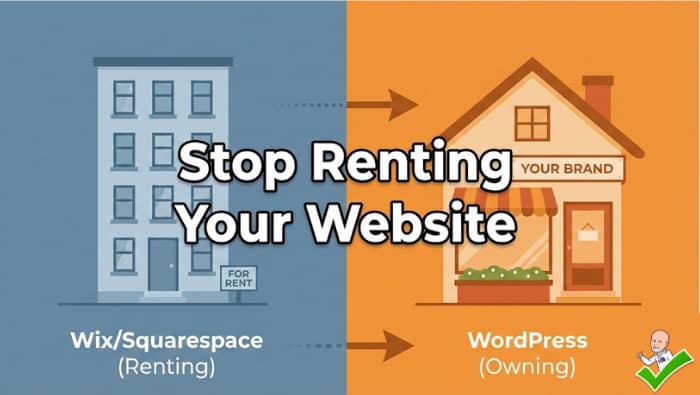
Where Wix bites you is later. You cannot export a Wix site. If you outgrow it, you are rebuilding from scratch on another platform, not migrating. We have rescued several organizations from exactly this trap. The design flexibility also hits a ceiling fast, and accessibility control is limited, which is a real problem if a grant later requires WCAG 2.1 AA conformance.
Best for: all-volunteer nonprofits with a small, stable site and no plans to scale.
Squarespace for Nonprofits: The Design-First Option
Squarespace is what we point people to when the site needs to look polished and the person running it cares about design but is not technical. The templates are the strongest in the industry, and a Squarespace site looks professional out of the box with very little effort. For an arts organization, a gallery, or a cause where visual storytelling carries the mission, that matters.
Squarespace handles events, email campaigns, and simple donation buttons natively, so a one-person communications shop can run the whole thing. It is more expensive than Wix month to month, and like Wix it is a closed system, meaning you trade control for convenience.
The same warning applies as with Wix: you are renting, not owning. You cannot move a Squarespace site to another host, and deep accessibility fixes are constrained by what the platform exposes. For a mission-critical site that has to meet funder requirements, that ceiling is the deciding factor.
Best for: design-conscious nonprofits with a single content manager and modest donation needs.
WordPress for Nonprofits: The Long-Term Home (With a Catch)
WordPress powers roughly 40 percent of the web, and for a nonprofit that intends to grow, it is usually the right foundation. This is the honest case for it, and the honest case against it. First, though, we have to clear up the single most common point of confusion.
WordPress.com vs WordPress.org: Know Which One You Mean
There are two things called “WordPress,” and mixing them up leads nonprofits to the wrong decision. WordPress.org is the free, open-source software that you install on your own hosting. You own the site completely, you can install any plugin, you can move it anywhere, and you can take accessibility as far as a funder requires. WordPress.com is a hosted commercial service built on top of that software, run by a company called Automattic. It behaves much more like Wix or Squarespace: easier to start, but with plan-based limits on plugins and control, especially on the cheaper tiers.
Team 218 builds on WordPress.org, self-hosted. When we make the case for WordPress below, and when we warn that it needs maintenance, we mean self-hosted WordPress.org. That ownership and control is the entire reason it is the right long-term home for a growing nonprofit, and the maintenance responsibility is the price of that control. WordPress.com trades some of that control away for convenience, which can suit a very small organization but gives up the donation-fee and accessibility advantages that make the .org route worth it. If a maintenance plan sounds like a burden rather than a benefit, that is a signal a closed builder or WordPress.com may fit you better, and we will tell you so.
The case for WordPress is control and integration. Donations can run through a dedicated nonprofit plugin such as GiveWP or Charitable, which keep more of each gift than a bolted-on widget and connect to receipting and donor records. Events, volunteer signups, grant-report pages, and multilingual content all have mature solutions. Because you own the site and can export it, you are never trapped, and you can host it anywhere. Accessibility is fully in your hands, which means a skilled builder can hit WCAG 2.1 AA conformance that funders increasingly expect.
The case against WordPress is maintenance. WordPress is not “set it and forget it.” Plugins update, security patches ship, and an unmaintained WordPress site is a liability, not an asset. This is the single most important sentence in this whole guide: if no one on your team will maintain it and you have no budget for a maintenance plan, do not choose WordPress. A neglected WordPress site is worse than a tidy Squarespace one.
Best for: nonprofits with donation, event, or reporting needs and either a technical staffer or a maintenance partner. This is the niche we serve with Iowa nonprofit web design, and we are candid with organizations when a simpler platform would serve them better.
Webflow for Nonprofits: Powerful, But Usually Overkill
Webflow produces genuinely beautiful, fast, standards-compliant sites, and designers love it. For most nonprofits, though, it is the wrong tool. The learning curve is steep, the editor assumes design literacy, and the things a nonprofit actually needs, native donations and event management, require third-party glue.
If you have an in-house designer or a Webflow-savvy volunteer and the site is primarily a storytelling showcase, it can shine. If you are a two-person team that needs to accept donations and post updates without a manual, Webflow will frustrate you. We include it here because it keeps showing up on “best of” lists, and someone should tell you plainly when to skip it.
Best for: design-led organizations with technical capacity and light transactional needs.
Website Builder Comparison for Nonprofits at a Glance
Use this to match a platform to your actual situation, not to the prettiest demo.
- Smallest budget, no tech help, small stable site: Wix. Live this month, cheap, forgiving. Accept that you cannot export it later.
- Design matters most, one content manager, modest donations: Squarespace. Best-looking templates, easy to run, closed system.
- Growing, needs donations and events, has a maintainer or partner: WordPress. Most control, best donation tools, funder-grade accessibility. Requires maintenance.
- Design-led showcase, technical capacity on staff: Webflow. Beautiful and fast, but donations and events need add-ons.
Notice that budget and who maintains the site drive the decision far more than template galleries do. That is the part the sponsored lists leave out.
What These Platforms Really Cost a Nonprofit Over Three Years
Sticker price is not cost. The number that matters is what you pay over the life of the site, including the donation fees that quietly come out of every gift. Here is how we think it through with organizations, using a realistic small-nonprofit scenario: a site with a handful of pages and roughly 15,000 dollars in online donations per year.
On Wix or Squarespace, the subscription is modest, but a bolted-on donation tool commonly takes a processing-plus-platform cut in the low single-digit percentages on top of card fees. On 15,000 dollars a year, a single extra percentage point is 150 dollars annually, or 450 dollars across three years, gone before it ever funds your mission. Multiply that across a growing campaign and the “cheap” platform stops looking cheap.
On WordPress with a dedicated donation plugin, the platform’s own cut can be zero, so more of each gift reaches the work. That saving offsets a real share of a maintenance plan. The trade is that WordPress carries an ongoing maintenance cost you should not skip, because an unpatched site is a security incident waiting to happen. So the honest comparison is not “free builder versus paid agency.” It is “subscription plus donation skim plus a rebuild when you outgrow it” versus “maintenance plan minus donation skim plus a site you own and never have to rebuild.” For a static brochure site, the builder wins on cost. For a donation-driven site that will grow, WordPress often wins on total cost within three years.
The point is not that one number always beats the other. It is that you cannot compare these platforms honestly on subscription price alone. Ask every vendor and every “best of” list what the donation processing actually costs and what happens when you outgrow the tool.
Common Mistakes Nonprofits Make Choosing a Website Builder
We see the same avoidable errors again and again when organizations inherit or rebuild a site.
- Choosing the platform before the maintainer. Pick who keeps the site alive first, then pick the tool that person can actually run. A powerful platform nobody maintains is a slow-motion failure.
- Ignoring accessibility until a grant requires it. Retrofitting WCAG 2.1 AA conformance onto a closed-platform site is painful and sometimes impossible. If any funder might require it, build for it from day one.
- Underestimating donation fees. Bolted-on donation widgets can quietly skim a meaningful percentage of every gift. Over a year, the “free” widget can cost more than a proper integration.
- Building on a platform you cannot leave. Wix and Squarespace sites cannot be exported. That is fine if you never outgrow them, and expensive if you do.
- Confusing “easy to launch” with “easy to sustain.” Every builder demos beautifully. Sustainability shows up in month thirteen, at renewal, with a security update pending.
A Simple Decision Path
If you want a shortcut through all of the above, answer these in order and stop at the first honest “yes.”
Is your site essentially a brochure, with no online donations and no plans to add them? If yes, choose Wix if budget is tight or Squarespace if design is the priority, and do not overthink it. You do not need WordPress, and we would not sell it to you.
Do you collect meaningful online donations, or will you within a year? If yes, the donation tooling and fees now matter more than templates. A closed builder’s bolted-on widget is fine at small scale but grows expensive. Lean toward WordPress with a real donation plugin, provided you can maintain it.
Does a funder, grant, or partner require accessibility conformance? If yes, a closed platform can box you in. Choose a platform you can fully control, which in practice means WordPress or, with technical capacity, Webflow.
Who is going to keep this site secure and current? If the answer is “nobody” or “an occasional volunteer,” do not choose WordPress no matter how well it scored above. Choose the managed simplicity of Squarespace or Wix, or budget for a maintenance partner. This question overrides all the others, because the best platform for a site nobody maintains is the one that maintains itself.
That last question is the one we wish more organizations asked first. Maintenance, not features, is what separates a website that serves your mission for years from one that quietly becomes a liability.
How Team 218 Helps Iowa Nonprofits
We are a WordPress web design and maintenance shop based in Williamsburg, Iowa, serving nonprofits across the state since 2014. When an organization comes to us, the first thing we do is the honest triage above: if a maintained WordPress site is right for your donations, events, and accessibility needs, we build and maintain it. If your situation genuinely calls for Squarespace or Wix, we will tell you so rather than sell you a platform you cannot sustain.
If you are weighing your options, see how we approach Iowa nonprofit web design, browse our case studies, or contact us for a straight answer about which platform fits your organization. Nonprofits in the Des Moines area and across Iowa work with us because we lead with the truth about trade-offs.
Frequently Asked Questions
What is the best free website builder for a nonprofit?
There is no genuinely free option that also holds up long term. Wix and Squarespace offer nonprofit discounts that lower the cost, and Google for Nonprofits provides some free tools, but a real, maintainable site has an ongoing cost. Be wary of “free” builders that lock you in or skim donation fees. The honest budget answer for a small organization is a discounted Wix plan, not a free tool.
Can a nonprofit accept donations directly through a website builder?
Yes, but how well varies. Wix and Squarespace offer native donation buttons that are fine for small campaigns. WordPress, through plugins like GiveWP or Charitable, gives you lower fees, recurring gifts, receipting, and donor records. If donations are central to your mission, the platform’s donation tooling should drive your choice more than its templates.
Does my nonprofit website need to be accessible?
Increasingly, yes. Many grants and government partners now expect conformance with WCAG 2.1 AA, and accessibility is simply the right thing to do for the people your mission serves. Open platforms like WordPress and Webflow give you the control to meet that bar. Closed builders like Wix and Squarespace limit how far you can go, so if accessibility is a funding requirement, factor that in before you commit.
What is the difference between WordPress.com and WordPress.org?
WordPress.org is the free, open-source software you install on your own hosting, so you own and fully control the site, can use any plugin, and can move it anywhere. WordPress.com is a hosted commercial service run by Automattic that behaves more like Wix or Squarespace, with plan-based limits on plugins and control. For a nonprofit that wants lower donation fees and full accessibility control, self-hosted WordPress.org is the stronger choice. Team 218 builds on WordPress.org.
Is WordPress too complicated for a small nonprofit?
WordPress is more capable and more demanding than Wix or Squarespace. For a small, all-volunteer organization with no maintenance plan, it is usually the wrong choice, and we will say so. For a nonprofit that needs donations, events, and accessibility and has either a technical staffer or a maintenance partner, WordPress is the strongest long-term home. The deciding question is maintenance, not size.
How much should a nonprofit budget for a website?
A discounted Wix or Squarespace plan runs a modest annual subscription with little or no build cost if you do it yourself. A professionally built and maintained WordPress site is a larger upfront investment plus an ongoing maintenance plan, which is what keeps it secure and funder-ready. Budget for the maintenance, not just the launch, because the launch is the cheap part.