The History of Web Browsers: From Mosaic to Modern Marvels (And Why It Still Matters for Your Business)
Where Did the Web Browser Come From? The Origins (1989 – 1993)
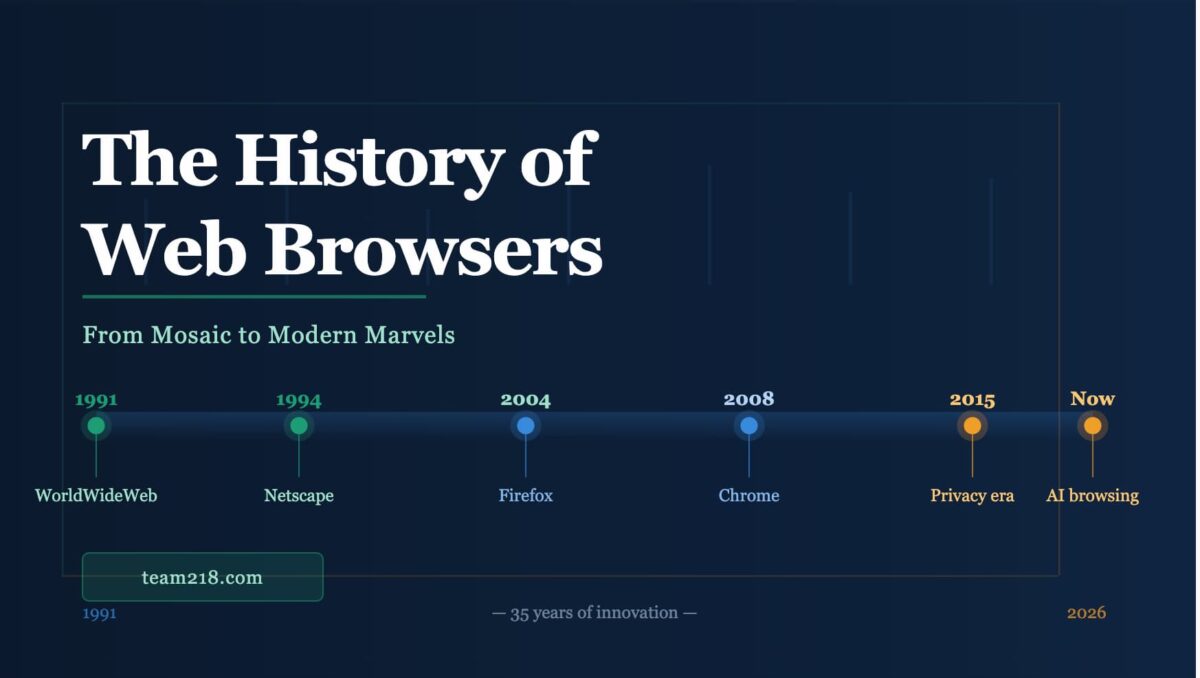
The 1st Web Browser – 1991
The origin of the web browser is inseparable from the origin of the World Wide Web itself. In 1989, a British scientist named Tim Berners-Lee was working at CERN – the European particle physics laboratory – and he had a problem. Researchers were constantly losing track of information as colleagues left the organization. His proposed solution was a system where documents could be interlinked across computers using something he called hypertext. He called this system the World Wide Web, and in 1991 it went live, along with the first browser: WorldWideWeb (later renamed Nexus).
Nexus was not for the average person. It ran exclusively on NeXTSTEP, a niche operating system used by a small number of researchers. There was no point-and-click interface, no images, and no real accessibility for anyone outside of academia. It was a proof of concept – a working prototype that showed the idea was viable, even if the execution wasn’t ready for the world yet.
That changed in 1993 with the release of Mosaic, built by Marc Andreessen and Eric Bina at the University of Illinois’ National Center for Supercomputing Applications. Mosaic did three things that fundamentally changed the trajectory of the internet:
- Inline images – photos and graphics could appear inside a webpage for the first time, not just as separate downloads
- Point-and-click navigation – no command-line knowledge required; anyone with a mouse could use it
- Cross-platform compatibility – it ran on Windows, Mac, and Unix systems, opening the web to the general public
By the end of 1993, Mosaic had been downloaded over a million times. The browser was no longer a research tool. It was a mass-market product. Andreessen recognized the moment for what it was, left CERN, and co-founded Netscape Communications in 1994 – and the first browser war was about to begin.
The First Browser War: Netscape vs. Internet Explorer (1994 – 2001)
Netscape Navigator launched in 1994 and immediately defined what people thought a web browser should be. By 1995, it controlled roughly 80% of the global browser market. It was fast for its era, updated frequently, and introduced features that feel foundational today – including cookies, which made login sessions and e-commerce possible. Without cookies, there would be no shopping cart, no “remember me,” no personalized web experience.
Microsoft recognized the threat. The internet was becoming the new platform, and if Microsoft didn’t control the browser, someone else would control the doorway to the digital world. In 1995, Microsoft licensed the Mosaic codebase, built Internet Explorer, and bundled it directly into Windows 95. This was the move that defined the next decade.
What Technologies Emerged From the Browser War?
The competition between Netscape and Internet Explorer accelerated web technology faster than it might have developed under a single dominant player. Several foundational technologies were born during this era:
- JavaScript (1995) – Created by Netscape’s Brendan Eich in just ten days, JavaScript gave web pages the ability to respond to user input without reloading. Every interactive element on the web today – dropdown menus, form validation, live search – runs on this language.
- CSS (1996) – Cascading Style Sheets gave developers control over visual design separate from content. Before CSS, layout was hacked together with HTML tables. After CSS, the web could finally look like it was designed by someone who cared.
- Browser plug-ins – Flash, QuickTime, and RealPlayer extended what browsers could do, paving the way for multimedia content before HTML5 made most of them obsolete.
Microsoft’s strategy worked – and then some. By bundling IE with Windows and giving it away for free, Microsoft eroded Netscape’s market share rapidly. By 1998, Netscape’s share had fallen below 50%. By the early 2000s, Internet Explorer held over 90% of the global market. Netscape, unable to compete, open-sourced its code in 1998 – a decision that would eventually give birth to Mozilla Firefox.
The browser war had been won. But what came next was arguably worse for the web than competition had been: a monopoly with no incentive to improve.
The Open-Source Renaissance: Firefox Changes Everything (2002 – 2008)
With Internet Explorer’s dominance came complacency. Microsoft effectively stopped developing IE for years after winning the browser war. The result was predictable: security vulnerabilities multiplied, page-rendering was inconsistent, and web standards stagnated. Developers were building for IE’s quirks rather than building for the web. It was a frustrating, stagnant period for anyone who cared about the internet’s potential.
The Mozilla Foundation released Firefox 1.0 in November 2004, and it arrived with a sense of urgency. It was faster than IE, more secure by design, and built around an open-source philosophy that invited community contributions. Three features drove its early adoption:
- Tabbed browsing – the ability to open multiple web pages in a single window rather than cluttering your taskbar with a dozen IE windows felt genuinely revolutionary in 2004
- Extensions – Firefox introduced the concept of user-installed add-ons, turning the browser into a customizable platform rather than a fixed tool
- Built-in pop-up blocking – a feature that sounds trivial today but was transformative in an era when opening a single website could spawn a cascade of thirty advertisement windows
Firefox captured nearly 30% of the global browser market by 2010. More importantly, it proved that an open-source project backed by a nonprofit could compete with one of the most powerful technology companies in history. It forced Microsoft to restart IE development and re-engage with web standards. The browser was competitive again.
How Did Google Chrome Change the Browser Market Forever? (2008 – Present)
When Google released Chrome in September 2008, it came with a technical white paper explaining its architecture. That was unusual. Browser releases didn’t typically come with engineering documentation. But Google understood that the technical decisions it had made were the product, not just the features on top of them.
Chrome was built around three core ideas that separated it from every browser that came before:
- Speed – Chrome’s V8 JavaScript engine compiled JavaScript to native machine code instead of interpreting it, producing performance improvements that were immediately noticeable
- Stability – each browser tab ran as its own isolated process, meaning one crashed tab couldn’t bring down the entire browser
- Simplicity – Chrome stripped the interface down to almost nothing, putting the web page front and center and hiding browser chrome (the menus and toolbars) as much as possible
Google’s ecosystem integration – Gmail, Google Search, Google Docs, Android – created a natural gravitational pull toward Chrome. By 2012, Chrome had overtaken Internet Explorer as the world’s most-used browser. Today, Chrome holds roughly 65% of the global browser market. It is not a competition. It is a dominance.
What Happened to Internet Explorer and Firefox?
Internet Explorer never recovered. Microsoft released IE9 and IE10 with genuine improvements, but the reputation damage was irreparable. In 2015, Microsoft retired IE in favor of a new browser – Edge – built on the same Chromium engine as Chrome. Internet Explorer 11, the last version, reached end-of-life in June 2022. If your website still has IE-specific code, it’s past time to remove it.
Firefox remains a credible, principled browser with a loyal user base. But its market share has declined to roughly 3% globally. Mozilla continues to innovate on privacy features and developer tools, and Firefox remains the preferred browser for many developers and privacy-conscious users – but it has not been able to reverse the long-term trend of Chrome’s expansion.
The Mobile Revolution: When the Browser Moved to Your Pocket (2007 – Present)
The second major disruption to the browser landscape didn’t come from a competing desktop browser. It came from a phone. When Apple released the original iPhone in 2007 with a full-featured version of Safari, it fundamentally changed user expectations. The mobile web was no longer a stripped-down experience designed for small screens. It was expected to be the same web, accessible from anywhere.
The implications for business owners were enormous. A website that looked great on a 1440-pixel desktop monitor and broke entirely on a 375-pixel phone screen was suddenly a liability. Responsive web design – the practice of building sites that adapt their layout to the device displaying them – went from a nice-to-have to a non-negotiable requirement almost overnight.
Key milestones in mobile browser history include:
- 2007 – iPhone launches with Safari, establishing mobile as a primary browsing platform
- 2008 – Google releases the Android platform with Chrome as its default browser
- 2010 – HTML5 begins to replace Flash, enabling rich media experiences without plug-ins
- 2015 – Google announces that mobile-friendliness is a ranking factor in search results – meaning non-responsive sites are actively penalized
- 2021 – Mobile traffic surpasses 60% of global web usage, a threshold it has not dropped below since
For a small business in Iowa, this means more than half of the people looking at your website right now are looking at it on a phone. If your site isn’t built for mobile, you’re not losing points on a rubric – you’re losing customers to your competitors who are.
The Privacy Wars: What Do Modern Browsers Actually Do With Your Data? (2015 – Present)
As the advertising economy matured, browsers became the front line of a conflict between user privacy and corporate revenue. Every major browser responded to growing privacy concerns, but not all responded the same way – because they don’t all have the same business model.
Safari introduced Intelligent Tracking Prevention (ITP) in 2017, using machine learning to identify and block cross-site tracking cookies. Apple, whose revenue comes from hardware and services rather than advertising, had relatively little to lose by doing this aggressively.
Firefox introduced Enhanced Tracking Protection as a default setting in 2019. Mozilla’s nonprofit status and mission-driven charter gave it similar freedom to prioritize user privacy over advertiser relationships.
Brave, launched in 2016 by former Mozilla CEO Brendan Eich (the same person who created JavaScript in 1995), blocks ads and trackers by default and offers a privacy-first browsing experience with optional opt-in advertising through its own rewards program.
Google Chrome has consistently been the most cautious about aggressive privacy defaults – which makes sense given that Google’s primary revenue source is targeted advertising. Chrome has announced plans to phase out third-party cookies, but the timeline has shifted multiple times under pressure from the advertising industry.
What Does Browser Privacy Mean for Small Business Owners?
The privacy evolution matters for small businesses in two ways. First, the tracking tools you may have relied on for remarketing and audience targeting are becoming less reliable as browsers block the cookies that enable them. Second, your Google Business Profile, local SEO, and organic search visibility are becoming more important than ever as paid targeting gets harder. The businesses that win in this environment are the ones that earned trust through content, consistency, and local relevance – not just the ones with the biggest ad budgets.
How Browsers Became the Foundation of Modern Commerce, Education, and Media
It is almost impossible to overstate how much of modern economic life runs through a browser tab. Consider what did not exist before browsers made them viable:
- E-commerce – Amazon, Shopify, eBay, and every online store that has ever competed with or complemented your local business
- Online banking – bill pay, account management, and financial services that used to require a branch visit
- Remote work – Zoom, Google Meet, Slack, and the collaborative tools that sustained businesses through pandemic closures
- Streaming entertainment – Netflix, Spotify, and YouTube, which fundamentally changed the entertainment economy
- Online education – Coursera, Khan Academy, and the platforms that democratized access to professional development and credentialing
For a small business owner, the browser is not just where customers search for you. It is where they compare you to your competitors, read your reviews, contact you, book your services, and pay for your products. Every interaction in that chain is a browser interaction. The quality of your web presence – your site’s speed, mobile experience, clarity of information, and local search visibility – determines how many of those interactions convert into revenue.
What Are the Next Frontiers for Web Browsers?
The browser wars have never really ended. They have simply shifted terrain. The next wave of browser innovation is already underway, and several trends will shape what browsing looks like over the next five to ten years:
AI Integration in the Browser
Every major browser is actively integrating artificial intelligence into the browsing experience. Microsoft Edge has Copilot built directly into the sidebar. Google Chrome is incorporating Gemini-powered features. Safari is testing Apple Intelligence integrations. The browser is increasingly becoming an AI interface – summarizing pages, answering questions about content, writing and editing text directly in web forms.
For local businesses, this means a new consideration: Generative Engine Optimization (GEO). As AI tools pull answers directly from web content rather than simply linking to pages, the businesses that appear in those AI-generated answers are the ones that have structured their web content to be cited by AI. It is an evolution of traditional SEO that is happening right now – not in five years.
WebAssembly and Near-Native Performance
WebAssembly (WASM) allows code written in languages like C, Rust, and Go to run in a browser at near-native speeds. This blurs the line between web applications and native software. Applications that previously required installation – video editors, 3D modeling tools, scientific simulations – can now run entirely in a browser tab. The browser is becoming less of a document viewer and more of a universal application runtime.
Privacy as a Competitive Differentiator
As regulatory pressure around data privacy increases globally – GDPR in Europe, CCPA in California, and emerging frameworks in other states – browsers will continue to tighten privacy controls. Browsers that offer genuine, verifiable privacy protections will attract users who value them. This will continue to shift the advertising landscape and accelerate the importance of first-party data and organic visibility.
Frequently Asked Questions About Web Browsers
Which web browser is the most popular in 2024?
Google Chrome holds approximately 65% of the global browser market as of 2024, making it the dominant browser by a significant margin. Safari is second at roughly 19%, driven largely by iPhone and Mac adoption. Microsoft Edge holds approximately 5%, and Firefox sits at around 3%.
What is the difference between a web browser and a search engine?
A web browser is the software you use to access the internet – Chrome, Safari, Firefox, and Edge are browsers. A search engine is a service that helps you find information on the web – Google, Bing, and DuckDuckGo are search engines. You use a browser to visit a search engine. They are related but distinct tools.
Why does browser choice matter for small business owners?
Different browsers render websites differently, handle privacy settings differently, and are used by different audiences. Knowing which browser your customers use helps you test your website appropriately. More importantly, understanding how browsers display your site on mobile vs. desktop, and how they handle things like local search and Google Business Profile results, directly affects how customers find and engage with your business.
What is a rendering engine and why does it matter?
A rendering engine is the component inside a browser that interprets HTML, CSS, and JavaScript and turns it into the visual page you see. Chrome and Edge use Blink. Safari uses WebKit. Firefox uses Gecko. Because each rendering engine interprets code slightly differently, a website can look slightly different – or in some cases significantly different – across browsers. Professional web development accounts for these differences through cross-browser testing.
Is Internet Explorer still being used?
Internet Explorer 11 reached official end-of-life in June 2022. Microsoft no longer supports it, and it does not receive security updates. While a small number of legacy enterprise systems may still rely on it, there is no reason for any modern website to optimize for or support Internet Explorer. If your current site has IE-specific code or conditional comments, removing them is a worthwhile cleanup task.
How do browsers affect website loading speed?
Modern browsers include significant performance optimization built in – prefetching linked pages, caching assets locally, lazy-loading images, and optimizing how JavaScript executes. However, a browser can only optimize what a website gives it to work with. Slow hosting, unoptimized images, bloated JavaScript, and excessive plug-ins will slow a site down regardless of what browser renders it. Page speed is primarily a website development challenge, not a browser challenge.
Final Thoughts: The Browser as a Business Asset
From Tim Berners-Lee’s experimental document system at CERN to AI-integrated browsing experiences that summarize, answer, and anticipate – the web browser has traveled an extraordinary distance in about thirty-five years. What started as a tool for particle physicists to share research became the primary interface through which most of the world’s commerce, communication, and knowledge exchange occurs.
For small business owners, the history of the browser is not just interesting trivia. It is the context for understanding why your website exists, why mobile-first design is mandatory, why local SEO matters more as AI changes search behavior, and why the digital experience you provide is often the first impression a potential customer forms of your business.
The browser is where your customers decide whether to call you or call your competitor. Make sure what they find when they get there is working for you – not against you.
At Team 218 Web Services, we build WordPress websites in Williamsburg, Iowa that are built for how browsers actually work – mobile-first, fast-loading, local-SEO-ready, and structured for both traditional search and the emerging world of AI-driven discovery. If your current site isn’t doing that job, we should talk.
What Browsers Do We Use Here at Team 218?
We get this question more than you might expect. For a web design agency based in Williamsburg, Iowa, browser choice is not just a personal preference – it is part of how we do the work. Every site we build gets tested across multiple browsers before it ever goes live, and the tools built into those browsers are part of our daily diagnostic workflow. Here is exactly what we use and why.
Google Chrome – Our Primary Browser
For daily work, we run Google Chrome – currently Version 146 on Apple Silicon (arm64). Chrome is our primary browser for the same reason it is the primary browser for roughly 65% of the global market: it is fast, its developer tools are the most mature and fully featured available, and its V8 JavaScript engine sets the performance benchmark that everything else is measured against.
The reason the architecture matters: we run Apple Silicon Macs (arm64), and Chrome’s native arm64 build delivers noticeably better performance and battery efficiency than the Intel-emulated version that ran on earlier Mac hardware. When you are keeping a dozen tabs open alongside design tools, code editors, and client dashboards simultaneously, that efficiency is not a footnote – it is a real productivity factor across a full workday.
Chrome’s DevTools are the primary reason it stays our daily driver for professional web work. Specific tools we use regularly include:
- Lighthouse – Chrome’s built-in performance and SEO auditing tool. We run Lighthouse reports on every site before launch to benchmark Core Web Vitals scores, accessibility, and best practices. Google uses these same signals as ranking factors, so what Lighthouse flags, Google notices.
- Network panel – shows exactly how a page loads, in what order assets are requested, which resources are slowing things down, and how the site performs on a simulated slow 3G connection. This is where we diagnose slow-loading sites.
- Responsive design mode – allows us to preview any website at exact device dimensions, from a 375px iPhone SE to a 1440px desktop display, without owning every device.
- Console and JavaScript debugger – essential for identifying and resolving scripting conflicts, particularly on WordPress sites where multiple plugins may be loading competing JavaScript libraries.
Brave – Privacy Testing and Ad Rendering
Brave is our second most-used browser, and it serves a specific and important purpose: it shows us how a website looks and performs when aggressive ad and tracker blocking is active by default. Brave blocks third-party scripts, advertising pixels, and tracking cookies out of the box – no extensions required.
This matters for client sites because a growing share of web users – particularly technically literate and privacy-conscious users – browse with similar blocking enabled, either through Brave itself or through extensions like uBlock Origin on Chrome or Firefox. If a site’s layout breaks when ad scripts are blocked, or if a contact form fails because a tracking pixel is being blocked, those users see a broken experience and the client never knows why their form submissions dropped.
Testing in Brave catches those breakages before they reach real users. It is also built on the same Chromium rendering engine as Chrome, which means layout rendering is nearly identical – making it a clean test of behavior under privacy restrictions rather than a different rendering environment entirely.
Firefox – Standards Compliance and Gecko Rendering
Firefox remains the only major browser running a rendering engine that is not based on Chromium. While Chrome, Edge, Brave, and Opera all share Google’s Blink engine under the hood, Firefox uses Mozilla’s Gecko engine – and Gecko interprets certain CSS and JavaScript behaviors differently enough that a site can look noticeably different between the two.
For this reason, Firefox is a mandatory stop in our cross-browser testing checklist. If a layout holds up in both Chrome and Firefox, it will generally hold up everywhere. If something breaks in Firefox, it often signals a CSS specificity issue or a non-standard implementation that should be corrected anyway.
Firefox also includes its own capable developer tools with a standout feature: the CSS Grid Inspector. Mozilla’s grid visualization tools are widely considered superior to Chrome’s for debugging complex CSS grid layouts – which we use extensively in Divi 5 builds. When grid alignment isn’t behaving as expected, Firefox is the first place we look.
Safari – Apple Ecosystem and WebKit Validation
Safari is the browser that surprises clients most when cross-browser issues arise – because Safari uses Apple’s WebKit rendering engine, which is the most conservative of the three major engines when it comes to implementing newer web standards. A CSS feature or JavaScript API that works flawlessly in Chrome and Firefox may not yet be supported in Safari, or may behave differently when it is.
With Safari accounting for roughly 19% of global browser market share – and a significantly higher percentage among iPhone and Mac users, which includes much of the professional demographic our clients serve – a site that is broken in Safari is broken for nearly one in five visitors. That is not an acceptable gap.
Safari testing also validates the mobile experience more accurately for iOS users than Chrome’s responsive mode can. While Chrome’s device emulation is excellent for layout testing, it does not replicate Safari’s specific touch behavior, font rendering, or scroll performance on an actual Apple device. We test in Safari on both desktop and iOS to ensure parity.
Why This Cross-Browser Testing Approach Matters for Your Business
The practical takeaway for any business with a website is this: your visitors are not all using the same browser. They are using Chrome, Safari, Firefox, Edge, Brave, and others – on desktops, laptops, tablets, and phones. A site that has only ever been tested in one browser is a site with unknown failure modes for a portion of its audience.
At Team 218, every site we build is tested across Chrome, Brave, Firefox, and Safari before launch – on both desktop and mobile. When we find discrepancies, we fix them before the client ever sees the site go live. That is part of what a professional web build includes, and it is one of the reasons our maintenance clients trust us to keep their sites working after launch too.
If you are not sure how your current website performs across browsers, we are happy to take a look. A cross-browser audit takes less time than you might think – and finding a broken layout in our testing environment is a lot less expensive than finding out about it from a frustrated customer.
Your website needs to look and perform perfectly in every browser your customers use. Team 218 builds custom WordPress websites that are tested across Chrome, Firefox, Safari, and Edge before launch. See how we build Iowa websites that work everywhere — or get a free audit to find out how your current site holds up.
Team 218 builds on that history every day. If you need a modern, fast website, see our Iowa web design services.